ON AIRRAP STUDIO

AI Rap Video Generator · CueSkit

Turn two front photos into a 15s duo performance with the original beat — saved privately in My videos.

Front Photos

Private upload · used only for your video. Sample photos stay local.

15s HD video with sound · 100 credits

From 2 photos to 15s AI video

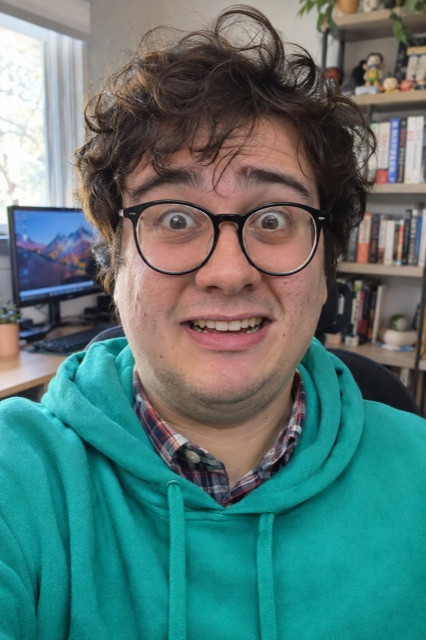
Input 1 · Left
Input 1 · Left
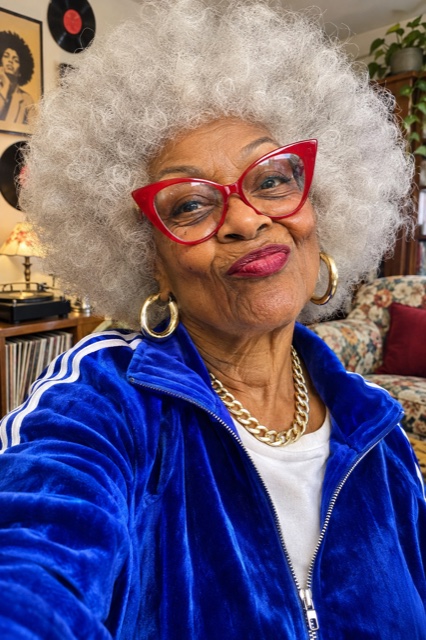
Input 2 · Right
Input 2 · Right

AI Rap Video Generator: from portraits to a shared performance

  1. Choose a performance that fits your joke

    Start by watching the featured reference and generated sample side by side. Check the setting, motion, soundtrack, and approximate length before choosing your photographs. The current template puts two people into an orange recording booth with a hanging microphone. CueSkit is a template-based AI rap video generator, so choosing the performance comes before fine-tuning a caption.

  2. Prepare one clear portrait for each performer

    Use a separate, sharp photograph for each person, with an eye-level camera and soft light on the whole face. Leave enough room around the head and shoulders to distinguish the subject from the background. Put each image in its own upload slot and inspect the previews before continuing. Confirm you have permission to use both images.

  3. Review, save, and share with context

    Sign in, check the credit requirement shown by the studio, and start the render when the inputs are ready. The resulting performance is intended to last about fifteen seconds; that is the clip length, not a guaranteed processing time. Review faces and movement across the whole result in My videos, then download it. Add a greeting or explanatory caption in your preferred editor if needed. Tell viewers it is an AI-made remix when the context could otherwise be confusing.

Two-Photo Rap Duo Video Maker for everyday social moments

For a friend-group joke, choose two people whose pairing will be immediately recognizable to the audience. A quiet friend and an enthusiastic performer can make a funny contrast without needing a complicated script. Ask both people to approve the finished clip before putting it in a public feed.

For a birthday, create a duo featuring the guest of honor and a consenting friend. Put the birthday greeting in a short caption or an edited end card after downloading. The template does not generate custom spoken wishes, so plan the message around the existing soundtrack instead of expecting a new vocal recording.

For couples, independent portraits can bring two people into one playful scene even when they are apart. Coordinate camera height and lighting, then keep the caption specific to the occasion. Pet-persona jokes are another creative idea, but the current portrait workflow is designed around human faces. Animal photographs may not produce a usable likeness. A safer creative direction is a consenting person in a pet-inspired outfit, with the joke explained in your caption rather than a promise of supported animal animation.

Explore the featured rap template and its preparation guides

The featured orange-booth duo is the current starting point in the CueSkit rap video generator. Its fixed setting and two-person composition make the transformation easy to compare with your original portraits. Open the dedicated template page below for focused photo guidance, example situations, pricing details, and answers about that particular performance.

Use the tutorial when you want the complete sequence from image selection to finding a finished result. Use the prompt and portrait guide when you need to diagnose input quality or explore scene-writing ideas for another tool. The studio itself does not expose a free-text prompt. The format breakdown explains the visual joke separately, so you can decide whether the reference suits your audience before spending credits on a render.

Hotel Lobby AISticky Bubblegum AI danceAI Snow Globe effectRead the complete upload tutorialCompare portrait tips and prompt ideasExplore the orange-booth meme format

Plan your first attempt before buying credits

A standard video uses 100 credits. Current one-time packs are 1 video for $9.90, 3 videos for $19.90, 5 videos for $29.90. There is no recurring subscription, and unused credits do not expire. Decide how many performances you actually need before choosing a pack. A single carefully prepared pair of photographs is a more useful first experiment than buying several attempts to compensate for blurry or obstructed faces. Failed generation tasks return their credits automatically.

Your photographs and results are stored privately rather than published into a gallery. Uploaded photos are deleted automatically after 7 days, and generated videos after 14 days. These windows concern stored media, not the expiry of purchased credits. Save a local copy of a result you want to keep. If you are making a surprise for someone, obtain permission to upload their portrait without assuming that a privately stored image removes the need for consent.

See the available credit packs

Frequently asked questions

What is an AI rap video generator?

It turns source material into a rap-style visual performance using a generation model. Here, two portraits provide the identities and a configured template supplies the performance format and original beat. The experience is built for making a short duo clip, rather than composing a complete song or recording a new voice track from written lyrics.

How is this different from filming a lip-sync video?

You supply still photographs instead of acting in front of a camera. That removes the need to coordinate a filming session, but it also means the result is an interpretation rather than a recording of your actual performance. Review the generated face and motion carefully, particularly when sharing with people who might mistake it for real footage.

Can I make a rap duo with a friend in another city?

Yes, you can prepare the two source photographs independently. Ask your friend for a recent, clear portrait with similar framing to yours, then check permission before uploading. You do not need to appear together in the original image. Avoid combining a low-resolution social-media thumbnail with a detailed original because their facial information will differ substantially.

Does the AI rap video generator write lyrics or clone voices?

The current studio uses the selected template’s configured original audio. It does not offer custom lyric entry or a voice-cloning control. If your idea depends on a particular greeting, add readable text after downloading or choose a different production workflow that explicitly supports the vocal changes you need.

What should I check in my photos before uploading?

Look for visible eyes, a clear mouth outline, even exposure, and enough detail to recognize the face at full size. Remove sources with heavy filters, large sunglasses, or other people competing for attention. Keep the head and shoulders in frame. A simple new portrait taken beside a window can be more useful than an elaborate but shadowy photograph.

Is CueSkit a free AI rap video generator or a subscription?

Rendering uses paid credits sold in one-time packs: 1 video for $9.90, 3 videos for $19.90, 5 videos for $29.90. There is no automatic monthly subscription, and unused credits do not expire. You can inspect the reference and sample before deciding to buy. Check the current pack and task requirement rather than assuming that viewing a sample includes a free generation.

Where do I find the finished performance?

Successful results appear privately in My videos, where you can review and download them. Generated media is deleted automatically after 14 days, so save a copy before that window ends. Do not rely on the dashboard as permanent storage for a birthday keepsake or a clip that you plan to edit later.

Can I use the output on social media or in a campaign?

Consider permissions for every part of the result: the people pictured, the photographs, and the soundtrack. A generated clip does not automatically grant rights to third-party music or another person’s likeness. For a brand campaign, check the applicable terms and intended distribution before producing a batch. Avoid suggesting that someone endorsed a product just because their portrait appears in a remix.

How do I improve a weak first result without guessing?

Compare the source photographs with several points in the finished clip. If one face drifts, replace that input with a sharper frontal portrait and keep the other constant. If the visual style itself is unsuitable, revisit the template sample before trying again. Distinguish a failed task, which returns credits, from a completed performance that you simply prefer to edit differently.